Thursday, May 24, 2012

MS DOS Font Color Change

Do you want change your CMD Font color.then try this tips.


To do this follow these steps

1) Click on Start >Run then Type CMD

2) Command Prompt will open.


3) Type "color z"


4) List of numbers of colors will appear...Example: Green=2


5) So, for changing CMD color to Blue color type:-"color 2"and then press Enter.

Now you done.


Installing The Windows 8 Consumer Preview Step By Step


Downloading the 2.5GB ISO image from Microsoft's website took me about 20 minutes, although that time can extend based on your Internet connection. The installation process itself—which I completed in a VMware Fusion virtual machine with about 1.5GB of RAM and one virtual CPU—was quite simple and took about 10 to 15 minutes.

First up, a betta fish (because it's a beta, after all)


Now we move into the installation process:


You'll have to enter a product key, of course. What would Windows be without the Windows activation process?


But instead of paying $200 for a license, all you have to do is grab the product key from the download page, as seen here:


Next, you'll agree to the Windows license terms, and select whether to do an upgrade or custom installation. The latter lets you choose which hard drive to use:


If you've installed Windows before, this screen will be quite familiar. This is the longest part of the installation, but it only took five minutes or so.


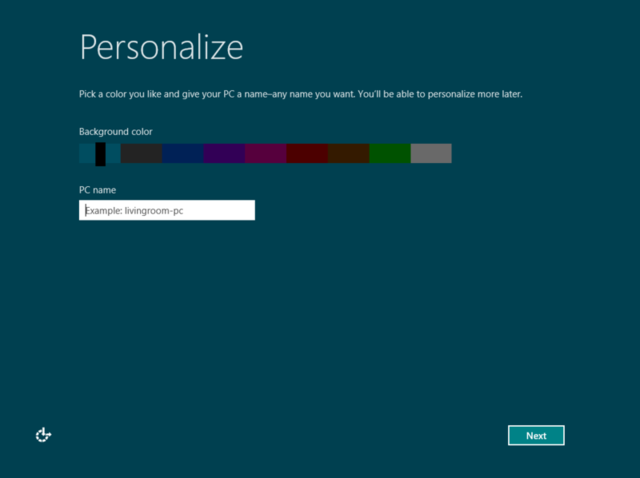
After installation, you'll see another betta fish, and then you can start personalizing your computer, starting with giving it a name and choosing a background color.


Now it's time to select installation settings.


If you select "custom," you'll go through options for sharing and connecting to devices; whether to automatically download updates and new device drivers; whether to send diagnostic information to Microsoft; whether to share information such as your name with applications; and whether to turn on the Windows Location Platform for location-based app settings. Here's an image of the settings for keeping your computer up to date and safe from viruses:


Now you can sign into the OS so that you can download applications from the new Windows Store and sync data across different computers.


You'll be asked to enter a mobile phone number, alternate e-mail address, and security question, so Microsoft can help you reset your password if you can't log in. After signing in, you'll finally be looking at Microsoft's brand-new Metro interface for Windows 8:


There's lots of stuff you can do in the Metro interface, such as accessing the Windows Store, and various applications such as Mail, SkyDrive, Photos, Internet Explorer, Xbox Live Games, and more. But if you find Microsoft's new tile-based setup overwhelming, you can switch back to the traditional desktop interface:


Now Installation is compleat.And now you've seen the Windows 8 installation process. As noted earlier, we'll have more articles on what it's like to use Windows 8 as the day goes on. Happy downloading and installing to all.


How touch-sensitive devices work?

Technologies of touch-sensitive devices to  control a computer are developed in two directions. First, the monitor can act as a measuring sensor and respond to the tip of your finger or other object and turn the touch into an electrical signal. monitor systems that respond to touch, are widely used in the management of automated counters and other movements that require gentle control. Another solution is to use plastic pads as measurement sensors. First, they were widely used with graphic panels, and today have become an integral part of many laptop computers. Movement of finger


rectangular pad stimulates identical run the cursor on the monitor. In most of these measuring senses moving fingers changes the distribution of electric voltage in switches of pad causing large differences in electrical signals. With the use of pads that respond to touch,moving cursor can reach the speed of up to 100 cm per second.

The system of touch-sensitive monitors - Electricity, released through the coating on the base layer of glass, produces a static electric field. Touching the monitors interfere with the field, and these changes the processor graphicaly displays.


1.Base layer of glass - The glass is coated with transparent electro enforceable material
2.Image Processor - The processor constantly scans an image of the electrostatic field. when changes occur in the image, processor makes calculation of coordinates.
3.The appearance of the electric field - a layer of conducting electricity with register changes in electrical voltage caused by touch.
4.The front layer of glass - the glass is electrically low voltage field that is changeable at the touch of a finger.

Wednesday, May 23, 2012

How hard disc works?


The area of data storage is a set of flat plates coated with magnetized lining.Data is stored as a series of coordinated magnetized area inside lining, called "domains". To read the data or write, a device called an executive device moves heads to read or write to position, vertical compared to the disk, while the plates spinning at high speed. Then, the signals are sent to the head, or the head  receives signal, which records or reads data.


1.FAT - in one part of the disc, in space to store files, information about the location of all files on the disk are stored.
2.Head "write-read" - Head reads and writes data hovering 0.002 mm above the plate surface
3.Lever of executive devices - Each head is "read-write" device placed on the light handle that rotates around the pin at one end and runs heads harmonized
4.Data cable - Trough this cable data flow between the hard disk, and devices that we call the "Master Disc". This device manages plates spins and data flow between the heads, "read-write" and the opposite of it and the executive devices.
5.Block devices executive - executive device receives a continuous flow of instructions to run the "read-write" heads.It can start running heads up to 50 times per second.
6.Magnet
7.Movable coil - coil turns inside of the permanent magnet in the center of the executive device. When an electrical impulse reaches the coil, causes her turn, and this in return causes shift of the lever of executive device.
8.Sector - on each track there are several sectors
9.Step motor - This motor is turning plates with speed of several thousand spins per minute
10.Track - Before first use, magnetized coating on each panel shares on the concentric tracks using special signal from the computer, a process called formatting.
11.A set of plates - information is stored on both of their sides.


Read-write Head - Once the head is correctly positioned, the magnet on top of her sends electrical pulses to ensure that the data will be written into proper sector.Binar data (0 and 1), encoded by electric current direction change, turnin into harmonized patterns in the "domains". The data from the disc is read the reversing the procedure, ie the passage of "domain" below the electromagnet, which induces a current in the wire.


1.Electromagnet - When data is written to disk, electrical impulses arriving there, produce magnetic fields that align "domains" on the track below.
2.Wire - this wire transfer written or read data registered between "read-write" head and the supervisory mechanism of the disk.
3."Domains" with data - Each domain is arranged in one of two possible directions. Changing direction in relation to the previous position of "domains" means 1, and when there is no change means zero.
4.Freely ordered "domains" - Where on the disc were never even written data, "domains" are freely ordered.


How to Remove Your Facebook Account Permanently

Facebook offers a convenient way to deactivate Facebook account. However, deactivation of Facebook does not completely and permanently the Facebook profile and accoucnt.

According to Facebook FAQ, deactivate Facebook account will render user’s profile and all information associated with it immediately inaccessible to other Facebook users. In other words, the account is effectively disappear from the Facebook service. However, the Facebook account is not been purged from Facebook’s servers. Instead, the profile information (friends, photos, interests, etc.) is saved, so that the account can be recovered and reactivated in future with the information intact if the user decides to do so, or regret on the deactivation decision.


Permanently delete the Facebook account will completely remove and purge all personally identifiable information associated with the Facebook account from Facebook database. This includes information like name, email address, mailing address, and IM screen name. However, do note that copies of some material (photos, notes, etc.) may remain in Facebook servers for technical reasons, but this material is disassociated from any personal identifiers and completely inaccessible to other users.
Facebook users who want to get rid of Facebook once and for what, and do not think that he or she will use Facebook again, Facebook provides a way to delete the account. Once Facebook account is deleted, it’s impossible to reactivate the account or retrieve any of the content or information previously associated in the account. There is no option for recovery once Facebook account is deleted.
To delete a Facebook account, log in to the Facebook account, and open this link then submit the “Delete My Account” 

Click on Submit button. Enter the password to confirm it’s your account, and the captcha security spam check. Then click on Okay button. An email will be sent to indicate that the Facebook account will be deleted in 14 days.


During the 14 days account deletion grace period, do not login or sign in to Facebook account, nor perform any action utilizing Facebook, such as Share on Facebook on Like in Facebook, or login and sign up to other websites by using Facebook Connect (Facebook user name and password credentials). Any interaction and usage of the Facebook account during the period will prevent the account from being deleted.
Alternative Method to Delete Facebook Account
If the above official method to delete the Facebook account fails, it’s also possible to email Facebook to request them to delete your Facebook account directly. The email address is:
privacy@facebook.com
Within a few days (allows up to a week), an email response should be sent by Facebook to confirm that the account has been permanently deleted.
If there is no response from Facebook, and you can still access your Facebook account or given an option to reactivate the account, try email Facebook again, with the following three email addresses:
privacy@facebook.com
support@facebook.com
info@facebook.com
The Facebook account is permanently deleted when user cannot login to the account anymore, and there is not message which offers user a chance to reactivate the Facebook account.so don't test this tricks on your original Facebook profile.


HOW TO KNOW THE DATE & TIME OF INSTALLATION OF YOUR WINDOWS


Input “systeminfo” command to it.

WAIT FOR INFORMATION TO GET LOAD..

Now you can look "original installation date" ......simple...enjoy

Speaking Notepad - Review


Speaking Notepad is handy text editor with powerful text-to-speech capabilities.

Main features:

    Handy notepad with speaking capabilities

    Supporting DOC, RTF, HTML, PDF and text files

    Recording speech into WAV, MP3 or WMA sound files

    Choose one of dozens of different voices

    Change voice speed and pitch in one click

    Powerful bookmark system

    Type & Read function

    SAPI4 and SAPI5-compliant voices

    Large number of visual styles

    Smart Spell Checker

    Efficient work with hot keys

    User-friendliness and handy interface


Download

http://speaking-notepad-v3.2.fyxm.net/

Upside Down Facebook Status Update

It's very easy & have to do simple steps...

Go to the website www.fliptext.org.
In the upper field type your status that you want to update and then click on Flip Text button.
Now in the lower field you will see flipped text of your status.


Copy it and update it as your status. 

If you want rename your computer folders with flipped text follow the same steps.

How To Protect Your Word Files With Password

We all use Microsoft Word to create documents.
and some times we dont want other people to access our documents
specially when you are on a shared computer in your company and you may have your certain secret data stored in your word document that should not be accessed by your boss or other employee’s.


To deal with such a situation Microsoft word 2007 integrated a security feature in Microsoft word so that you can password protect your files.


just follow these simple steps to make your document protected


Click on the Microsoft Office Button present on the top left corner of the window.
Now Click on the Save As option
Now a new window will pop up.
Click on Tools option at the bottom of the window.
Now you will have two options.
You can select either one or both options
One is Password To Open it will ask for the password every time the document is opened.
So to view the document you have to enter the password first.
Second is Password To Modify it will ask for the password every time somebody tries to modify the document.

Tuesday, May 22, 2012

How To Repair Task Manager Disabled Problem


It is due to some kind of virus/ trojan activity which normally disables the task manager.Now due to this problem when ever the user press alt+ctrl+del to launch windows task manager it gives an error saying “Task Manager is being disabled by your administrator”.


Solution:

To Enable the Disabled Task Manager on your system

1. Press window key+r to show run prompt
2. Follow the following steps

    Enter gpedit.msc in the run prompt and click OK
    In the Group Policy settings window
    Select User Configuration
    Select Administrative Templates
    Select System
    Select Ctrl+Alt+Delete options
    Select Remove Task Manager
    Double-click the Remove Task Manager option’.
    Set the property of this item as disabled.


For Those who use Windows XP Home Edition can use the registry to enable Task Manager

1. open start –> run and type regedit

2. Navigate to the following path:

Hive: HKEY_CURRENT_USER\Software\Microsoft\Windows\CurrentVersion\Policies\System
3. You will find a registry key with name DisableTaskMgr of type: REG_DWORD
4. Double click the key with and set the Value to 0
5. Exit the registry and restart to see the effect.

All Labels

Android Android Tricks Apple Apple Tricks being Bentley beyond Black Blizzard Blogger Blogger Gadget Blogger Tricks Bluetooth brilliance Buffalo business Business camera Camera Canon Canons Carrier cellular Cellular Challenge Chicken Chrono Cisco Close Cloud collaboration com combined Comics coming Command Computer Tricks Concept Concepts Confirmed Connect Connector Continental Conundrum Coolpix Creed Dawnguard defeat details Diablo doesnt Double dramatic Droid durable E-Money EA4500 Edition energizing EOS1D Episode Essentials expansions Facebook Tricks Fantasy Featured features Ferrari figure Final first footage forget Fourth Freeform Freeman front Gadgets News Galaxy Game News gameplay games Gamesplanet GamesRadars GConnect Google Gordon Grand GreatCall Griffin GTechnology Guardians Guild Hacking Tricks HalfLife HDPATU3 HE400 Headphones HiFiMan Hitman holder horrifying Iconia IdeaPad Incredible ingame Innergie Inspiration Internet Tricks iPhone iSung itself Jelly Jitterbug Justice Kickstarter Killer killing launch launches leaked Lenovo Lexus lifted Limbo Limited Linksys loads Local MacBook Machines Make Money Marvel Mazda Micro Microsofts MiddleEarth might MiniStation Mission mobile Mobile Tricks Monster montage Mount MS Office News Nexus Nikon North October offers Online Optimus Other Other Tricks partially parts Payne phone phones physics planned player PlayStation PocketCell potential power Premium Professional Quantum Quarters Raider ready really Rechargeable recut register release released remixed Remote Resident resolution restrictions revealed review Robot roundup Router running sample Samsung Sauron season September sequel Series shows Shure silver Skyrims Smart smashing Sniper sniping Software Tricks Something Sonos Special sports SRH1440 stirs Studios stuff subway Summer Supertrailer Tablet Tacoma teased Technology Tegra Telltale Theres thickness things Thirds Thunderbolt today Toshiba Total Touring Toyota trailer trailers Tricks turning unlocked Unofficial Unveiled Valve Verizon video videos Virus Tricks Walking weeks Which Window Windows Windows 7 Windows 8 Windows Vista Windows XP winners Wireless zombie